Category: Safety | Internet Security

Common Scams to Be Aware Of and Prepare For – Part 1
Common Scams to Be Aware Of and Prepare For

So many scams, too little time to stay ahead of them all. Cyber criminals are not nice people, but they certainly are creative; always thinking of new ways to scam you. Scammers are opportunists working in multiple areas at the same time. Their motivation is money. They will either access your personal information and sell it to others or easily steal your money outright.

You may not know about every scam that’s on the internet or offline in the real world. But there are common ways of how you can be aware of and prepared for all potential scams. That doesn’t mean you shouldn’t try to learn about old scams and new ones that are created.

Common Scams to Be on the Look Out For

In Part 1 of our scam awareness series, we look at common scams and new scams that are ever emerging.  Through this education on scams, you’ll notice a persistent theme of how you can be prepared. Even if a brand-new scheme designed to fool you rears it’s ugly head for the first time, there are consistent things you can do to protect yourself.

Most people become victims of scans through email and texts.  The first defense against malicious messages is to follow the SLAM Method.

SLAM stands for Sender, Links, Attachments, and Message. All of these elements should be scrutinized.  

Sender: Don’t accept message requests from outside of your known circle of friends or connections.  Don’t accept friend requests from anyone you don’t know.

Links:  Do not click on any links in social media posts, profiles or messages unless you can see the full URL and be certain that the site is legitimate.

Attachments: Never download or open attachments from social media posts, profiles or messages.

Message:  Look carefully at the body of any social media message or post that you are interacting with. If it feels off, contains misspellings, off grammar or even uncharacteristic emojis, you might be looking at a phishing attempt.  Be wary of messages that push you to take some urgent action or another.

Remember the SLAM Method throughout our scam educational series.  But we’ll also be looking at scams that also happen via direct communication with scammers.  Let’s begin!

Charity Scams

Types of charity scams include:

Crowd Sourcing Scams:  Don’t take for granted that all is legit. Scrutinize the validity of the crowding funding request.

Post Tragedy Scams:  When a tragedy strikes, scammers will sometimes spoof the website or create a site that closely resembles the site of a legitimate donation site.

Firefighter, Police and Military Scams:  These scammers will often use familiar or local organizations to build trust and take people off guard.   Some will directly target military veterans and their families.

Warning Signs of Charity Scams:

  1. Requests for cash, money wire, or gift card donations can be a red flag. Use a credit card instead.
  2. Non-tax deductible donations are a red flag that a charity may not be legitimate.
  3. Pressure Tactics: Real charities will never use a hard sell or pressure tactics to solicit a donation.
  4. Fake information: Charitable donation websites almost always end with .org and domains will always start with https:// not http:// without the “s”.

Beware of fake charities based related to common world issues, such as what happened during the pandemic. Scammers prey on the emotions of people who want to help those in need of disaster relief, such as during war or refugees fleeing their country for safety or a better life.  Charity and disaster fraud often increases during the holiday season.

Cybercriminals will also call people thanking them for a previous donation, a donation which may have not been made. Veteran fraud and disaster fraud are often the premise used for fake charity scams.

Marketplace Scams

There are two categories within marketplace scams.

Non-Payment Scam:   In a non-payment scam, cybercriminals will use a phony screenshot of a completed cash transfer to trick a victim into shipping an item.

Non-Delivery Scams:  Scammers trick victims into paying for goods and services that are never delivered.  They offer prices that are almost too good to be true.

Non-delivery scams advertise popular items and services at deeply discounted prices and ask for payment using gift cards or cash payment through a payment app.

Marketplace scams come in many forms so always be cautious.  These creative types of scams also happen when individuals are selling items online.

Prevention Tips:

  1. Know your marketplace:  When shopping online, do so on trusted sources with secure processing and payment policies that protect consumers.
  2. Use a credit card:  Credit card companies have systems and policies in place to protect against a fraud.
  3. Stay on the platform you are shopping on:  Scammers will try to bait their victims into leaving the marketplace platform for messaging and payment.

Gift Card Scams

It may seem obvious to many that that any legitimate organization would ask to be paid in gift cards.  Still, it’s a common scan that pulls people in. Scammers create a sense of fear and urgency pressure their targets into acting quickly without thinking. Asking to keep the transaction a secret is a warning sign of a gift card scam.

Cyberthieves prefer gift card payments because they offer anonymity.  Unlike other forms of payment, transactions can be anonymous and are difficult to trace or reverse, unlike bank transfers.  Gift cards are also widely available and offer immediate access to funds once the victim buys a gift card at a local store and send the scammer the number and pin to redeem the funds.

What To Do If You Are Targeted

Any gift card payment request is likely a scam and should be ignored. If you receive a phone call, email, or text message requesting a gift card as payment, immediately hang up or delete the message.

Contact the company directly using a known number or email address instead. If you have an account with the organization, log into your account to see if there are any notices, such as an overdue payment.

Display Name Scams

Display name spoofing occurs when the cybercriminal manipulates the sender’s display name or makes the display name look like an email address.  Seeing a legitimate display name deceives you into believing that it’s from a trusted email source.

If a sender looks familiar, but the message makes unusual requests, it is best to contact the person or company directly through another method of contact.

Delivery Scams

Types include:

Pet Delivery Scams: These are fake ads where payment is required upfront.

  • Protect yourself asking to see the pet in person before you pay.

Fake Delivery Notifications:  Here, scammers mimic big name online shopping or shipping companies in their delivery scam messages. They claim there is a problem with the delivery of your package, or you need to confirm something has been delivered.

  • Be cautious of clicking on links or downloading attachments.  Never enter personal information when requested. Verify the tracking number and status of a delivery through the companies’ official website. 

Non-Delivery Scams:  An example of a non-delivery scam in this training involves making a purchase online, but never receiving the order or confirmation details of the purchase.  Only make purchases on reputable websites.

  • When you do make an order, follow up immediately if you don’t receive a confirmation of your order. Check the address on the website and phone number. 

If you are unable to make contact and your credit card was charged by a non-delivery scammer, you should call your credit card company and consider deactivating the card.

Transportation Scams

Scammers will make phone calls or send messages via text or email claiming that your flight has been delayed or cancelled. Messages will likely include links that offer a refund for the flight or an opportunity to rebook for a small fee.  Airlines will never ask for a fee to rebook. Contact your airline directly on their website or call them to enquire about the status of your flight.

Cyberthieves also set up fake websites or send messages offering deals on rental cars as well. Always verify the URL and company phone number before booking. In your unsure, going to directly to the official website is always better than clicking a link.

Learn the dangers of freight scams.  Be on the look out for gifts and rewards being offered by transportation companies. Tread carefully and do your research before jumping on a deal that may be a scam created to steal your information or your money.

Technical Support Scams

Technical support scams often involve cybercriminals pretending to work for well-known companies to fix non-existent issues. They manipulate victims to build trust and convince them to comply with their demands.

A scammer gaining remote access to your device remotely can install harmful software or access sensitive data, leading to significant privacy and financial risks.

Requests for payments to be made via gift cards or cryptocurrencies should always be treated as a scam.

Technical support scams often start with unsolicited pop-ups or phone calls warning of an issue with your device.  These tactics are designed to create urgency and trick victims into engaging with the scammer.  Malware may contain a fake phone number urging you to call to fix issues you are having with your device.

Pop-ups may happen when visiting infected websites.  Or, they can occur if your computer is infected by malware. To guard against these issues, install anti-malware software to both prevent and remove malware.

Even if you are certain that you may be dealing with a legitimate company who has called about your account, express your concern and state that you wish to call them back directly using a phone number posted on their companies official website.

Never give our personal information to anyone that calls you.  Legitimate companies will not call you and ask you for personal information.  Remember, that with much of our personal information being available on the dark web due to data breach, scammers can easily sound like they are legitimate when they state facts about your personal info.

Conclusion

Most scams come to us when we have our guard down. They prey on our emotions by using fear filled headlines or threats of potential loss of accounts or hard-earned dollars. It’s not uncommon to receive an email, phone call, or text that is related to something we have already done.

You may be expecting a package that you ordered a few days earlier. You may have booked a flight.  Maybe you happen to be needing of a product or service. That fact that relevant messages come to us are simply a coincidence. When you receive a text or email out of the blue, always ask the question; “Is this real? Or is it a scam?”

Some scams also encourage users to download malicious apps in order to receive a reward or discount. This does not prey on our fear, but entices a natural human desire for personal gain. Be cautious of all app downloads in every situation.

In one second you could infect your devices with malware to give away personal login information. However, it only takes a few seconds more to carefully review the message to verify it’s legit. When in doubt, go to Google and search for the company. Visit their website directly. Or, login to trusted websites directly at the source from a personal bookmark, not though an email link.

If an email or text message lines up with a legitimate notice about a login verification or purchase you just made, it’s still a good idea to only click the link after you’ve double checked that it’s not going you to a different site.  This can be done by hovering over the link to see the destination.

Continue to educate yourself on how to spot scams, while being mindful that exercising caution is your first best step to protecting yourself.   Be prepared by thinking twice before you click or react to any message or phone call. Take a breath and take the time to do a bit of research. I will save you a world of trouble.

Continue your education, read about Common Scams – Part 2.

Read our Glossary of Online Scams and Cyber Threats

Share This Article

What Families Need to Know About Fraudulent Text Alerts

A vector illustration of a hand holding a smartphone showing chat bubbles of conversation between a human and a bot.

Fraudulent text alerts, a scam also known as “smishing,” are becoming more common. These deceptive messages create a sense of urgency among receivers, tricking you into revealing personal information or sending money. They often impersonate legitimate organizations like banks, government agencies or popular retailers.

You must know how to spot these scams, protect your data and teach your family to be savvy digital citizens.

What Is Smishing and Why Is It a Threat?

“Smishing” is a clever term for phishing scams sent via text message. Think of it as a digital con artist knocking on your phone’s door. Scammers send deceptive texts under the pretense of being an organization you can trust, like your bank, a delivery service or even a government agency. The goal is simple and malicious — to trick you into clicking a dangerous link, downloading harmful software or revealing sensitive data like passwords and financial information.

Families are prime targets because they often include members with various levels of digital know-how, from tech-native teens to less-wary grandparents who juggle multiple electronic devices between them.

How to Spot a Fraudulent Text

Scammers are clever, but too often rely on the same playbook. By familiarizing yourself with their tactics, you can empower your family to spot a fraudulent text more easily. These fraudsters design their messages to bypass your rational thinking by triggering an emotional response, such as panic or curiosity.

Instead of immediately taking the bait, pausing and looking for the telltale signs of a scam will stand you in good stead. Nowadays, scammers may impersonate law enforcement officers and even family members.

Trusting your gut is a good place to start, but knowing the specific red flags provides a concrete defense against these digital intruders. These are the most common signs that a text is a trap.

Unexpected Urgency

Scammers manufacture a crisis to rush you into making a mistake. You might get a text claiming that your account is locked, that a payment has failed or that a suspicious purchase was made with your card. These messages demand immediate action under false pretenses. Remember, legitimate organizations rarely use such high-pressure tactics or threaten you via text.

Suspicious Links and Attachments

A core rule of digital safety is to never click unexpected links or attachments in unsolicited text messages. These are the primary tools scammers use to inflict damage. That innocent-looking link could lead to a convincing but fake website designed to steal your password, while an attachment could install malware directly onto your device to harvest your data. If it’s a legitimate message, you can verify it through the organization’s official channels.

Generic Greetings and Grammatical Errors

Legitimate companies you deal with should know your name. If you receive a text with a vague opening like “Dear Valued Customer” or “Hello Sir/Madam,” be highly suspicious. Scan the message for obvious spelling mistakes and poor grammar, as these errors are a red flag that the text is unprofessional and almost certainly fraudulent.

How Your Family Can Protect Itself

Knowing how to spot a scam is the first step, but taking proactive measures is how you build a digital fortress around your family. You don’t have to be a cybersecurity expert to boost your defenses against fraudsters significantly. By adopting a few simple but powerful habits, you can make your accounts and personal information much harder for criminals to access.

Here are the most effective, actionable steps your family can take to stay safe from smishing attacks.

Incorporate Multi-Factor Authentication (MFA) and Fraud Text Alerts

MFA is an effective tool in your security arsenal, acting like a second lock on your digital door by requiring two or more forms of verification to log in. As security-conscious institutions note, fraud can affect anyone, so you should implement more stringent controls on your account activity to protect your family from unauthorized third-party access. Experts say MFA makes your accounts 99% less likely to be hacked.

Verify, Then Act

When a text demands urgent action, follow the simple but powerful principle of “stop, think, and verify.” Instead of using the phone number or link in a suspicious message, go directly to the organization’s official website or call a trusted customer service number to confirm whether the alert is legitimate. This one habit can foil the scammer’s entire plan.

Teaching Kids and Teens About Text Scams

These days, teaching digital safety is as crucial as teaching road safety, especially with 90% of teens having access to smartphones. The goal is not to scare kids, but rather to empower them as smart digital citizens. Framing the topic of text scams as a life skill will build your child’s critical thinking and resilience. By having open conversations, you encourage them to react confidently to online threats. Your assistance will make you a trusted ally they can turn to, ensuring they don’t have to face risks alone.

Establish an Open-Door Policy

Create a judgment-free zone where your kids can show you a strange text without fearing punishment or losing their phone. Reassure them that you are a team and their safety is the priority. This open-door policy encourages them to report suspicious activity, potentially stopping a scam early.

Use Real-World Examples

Abstract warnings are forgettable while practical lessons stick. Find real smishing examples online and review them with your kids. Point out the red flags like the weird link, the urgent tone and the spelling errors to provide a better understanding. These hands-on activities make the lesson tangible and make it easier for them to apply the knowledge.

Apply a Family-First Approach to Fraudulent Texts

Protecting your family from text scams relies on vigilance, verification and education. Stay vigilant for red flags, directly verify requests with the source and educate your family on these simple tactics to build a powerful shield. With these habits, you can all confidently navigate the digital world.

Author Bio:
Dan Parks is a senior writer at Modded.com, specializing in education and technology content. His priority is creating actionable insights for parents and educators and making digital topics understandable. Ultimately, Dan is dedicated to empowering families to navigate the world securely and confidently.

Share This Article

Security Awareness Training in Schools: A Parent’s Guide

A row of students typing on black computer keyboards in a classroom, with the focus on a student's hands in the foreground.

Most parents picture school cybersecurity as a technical problem. Firewalls, content filters, someone in the district office who keeps the servers running. But incidents usually start somewhere far less technical, with a person clicking a link they shouldn’t have. Closing that gap is what security awareness training is for.

It rarely comes up at back-to-school night. It probably should. Your child’s school holds their address, medical notes, emergency contacts, and years of academic records, and many of the people handling that information are already juggling dozens of responsibilities throughout the school day.

What the Training Actually Covers

The name sounds more corporate than the reality. Strip it down and it’s a series of short, repeated lessons that teach staff to recognize the tricks attackers actually use. Fake login pages. An urgent email from someone claiming to be the principal. A text about a payroll issue that has to be fixed right now, before the end of the day.

Most programs pair those lessons with simulated phishing emails sent to staff inboxes. The goal is education rather than punishment, so anyone who clicks gets a quick, low-drama coaching moment instead of a reprimand. Over time, that builds the reflex of pausing before typing a password into anything.

Why Schools Get Targeted

Districts sit on enormous amounts of personal data and rarely have a security team to match. CISA, the federal agency that leads U.S. cyber defense, has described K-12 schools as “target rich, cyber poor,” noting that cyber incidents affect schools with concerning frequency.

Student records can be especially valuable to criminals because they often contain enough personal information to support identity theft, financial fraud, or account takeover. Because almost nobody checks a child’s records for years, that kind of misuse can stretch well into adulthood, which is part of why student data privacy deserves attention beyond the technology department.

What Effective Training Looks Like

Effective security awareness training is ongoing rather than a one-time event. Staff get short lessons spread across the year, practice spotting phishing attempts through realistic simulations, and receive extra guidance when something slips past them. The aim is building habits, not clearing a requirement off a list.

One annual training session is rarely enough to build lasting habits. More advanced programs reinforce good decisions all year and adjust what each person sees based on how they did last time. Someone who reliably spots fake login pages doesn’t need the same lesson as someone who has clicked twice in a row.

The other thing worth looking for is how a district measures results. Completion rates show participation, but they don’t reveal whether behavior actually changed. That shows up somewhere else: fewer clicks on simulated phishing as the year goes on, and more staff reporting suspicious messages instead of quietly deleting them.

Costs vary with district size, the number of accounts covered, and the features included, so a program that fits one district’s budget may not fit the next one over.

Where Students Fit In

While staff receive most formal training, students also face phishing attempts through fraudulent texts, gaming platforms, messaging apps, and school accounts. Spotting a fake school portal login calls on the same instinct as spotting a fake Roblox giveaway.

Schools that include students tend to keep it light. A short lesson during advisory. A poster in the hallway. A classroom conversation about phishing, smishing, and vishing, and how each one works. Kids hold onto it better when it isn’t framed as punishment for getting fooled.

Questions Worth Asking at the Next School Meeting

  • Does staff training happen throughout the year, or is it one slideshow in August?
  • Does the district run phishing simulations, and does anyone follow up with the people who click?
  • How does the district know the training is working, beyond counting who finished it?
  • Are students covered, or is it staff only?
  • Who can see student records, and what happens to that access when an employee leaves?
  • What is the plan for the first hour after a suspected breach?

Even if every answer isn’t available on the spot, schools should be able to explain how they approach these issues and where families can learn more. Clear, thoughtful answers are usually a sign that cybersecurity is being taken seriously.

What Families Can Practice at Home

The habits are the same at your kitchen table as they are in the front office. Slow down on anything urgent. Real institutions don’t need your password in the next ten minutes.

Check the sender’s actual address, not the display name. If a message claims to come from the school, open the school portal yourself instead of tapping the link. The FTC publishes a plain-language guide to spotting phishing that’s short enough to read through with a middle schooler in one sitting.

Technology matters, but the people using it matter just as much. Schools that reinforce safe habits throughout the year are generally better prepared to recognize and respond to threats before they become larger problems.

Common Questions

Is this training required for schools?

Requirements vary by state. Some states set cybersecurity training rules for public employees, and cyber insurance providers increasingly consider staff security training when evaluating organizational risk. Your district office can tell you what applies where you live.

How often should staff be trained?

Many modern programs use shorter lessons on a monthly or quarterly cadence, paired with regular phishing simulations, because frequent reinforcement tends to be more effective than a single annual session. Ask your district which approach it uses.

Should students be trained too?

When schools have the resources to include students, it’s worthwhile. Students log into school accounts every day and encounter scams through games, messaging apps, and other online spaces, so even a few short lessons each year can help them recognize suspicious activity.

Share This Article

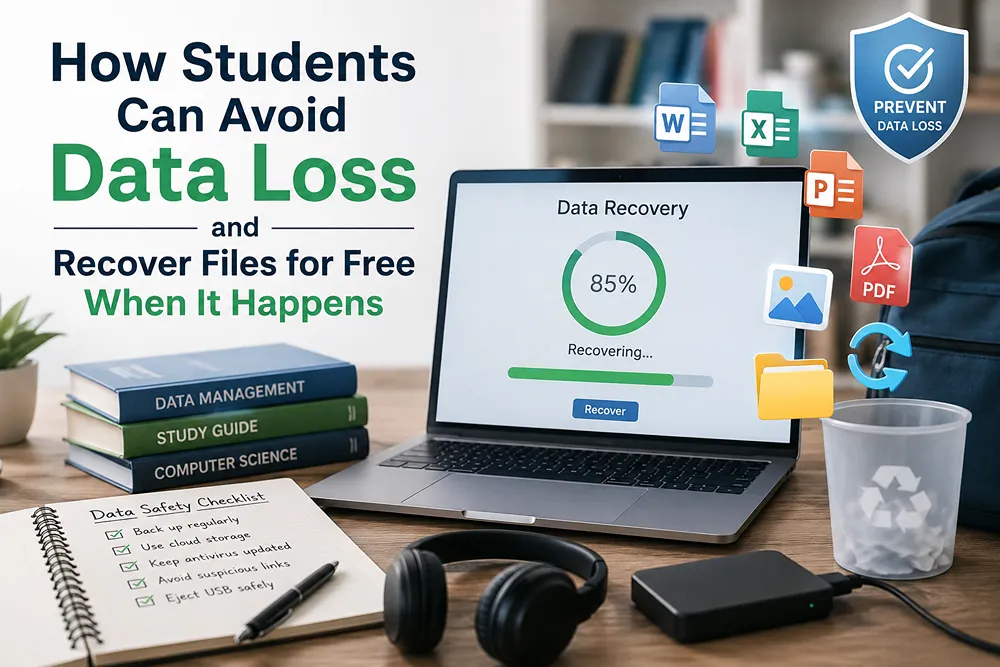
How Students Can Avoid Data Loss and Recover Files for Free When It Happens

Internal view of a computer disk drive.

Nothing ruins a semester like a laptop that dies the night before something’s due. A research paper, group project files, a thesis draft you’ve been chipping away at for months — losing that isn’t something you can just redo before morning.

Most of it never had to happen. A few habits keep data loss from being a possibility in the first place. And if the files are already gone, there’s a decent chance you can still get them back, no expensive software or repair shop needed. That’s what this guide walks through: what to do before a crash, and what to do after one.

How Students Can Avoid Data Loss and Recover Files for Free When It Happens.

Why Students Are Especially Vulnerable to Data Loss

Students face a unique combination of risk factors that make data loss more likely than it is for the average computer user:

  • Old or shared hardware. Hostel and library computers, hand-me-down laptops, and budget SSDs are more prone to failure.
  • Constant multitasking. Switching between assignments, downloads, and browser tabs increases the chance of accidental deletion or file corruption.
  • Deadline pressure. Late-night, rushed saves are a leading cause of corrupted or incomplete files.
  • Limited backup habits. Most students don’t have a structured backup routine — one lost laptop can mean a lost semester.
  • USB and pen drive reliance. Cheap flash drives are a common (and common-failing) way students move files between library computers, labs, and their own devices.

Understanding these risks is the first step toward avoiding them.

7 Simple Habits That Prevent Data Loss

You don’t need to be a tech expert to protect your work — just consistent.

  1. Follow the 3-2-1 backup rule. Three copies of important files, on two different types of storage, with one kept elsewhere. For students: laptop, external drive, and Google Drive or OneDrive covers it.
  2. Turn on autosave and version history. Google Docs, Word, and most apps have this built in. It’s the difference between losing a paragraph and losing an entire assignment.
  3. Use cloud storage for anything you can’t afford to lose. The free tiers of Google Drive, OneDrive, or Dropbox are plenty for assignments, notes, and research files.
  4. Eject USB drives properly. Pulling a pen drive mid-transfer is one of the most common causes of corrupted files among students. Use “Safely Remove Hardware” every time.
  5. Don’t rely on shared or public computers for your only copy. Library and lab machines often get wiped automatically — treat them as temporary, not storage.
  6. Keep your laptop’s software updated. Outdated systems and drivers crash more often, and crashes mid-save are how files get corrupted.
  7. Don’t ignore warning signs. Slow boots, clicking noises, or “disk error” messages mean back up now, not later.

What to Do the Moment You Realize Data Is Lost

If you’ve deleted a file, formatted a drive, or just had a crash, stop using that drive or folder right away. Every new file you save risks overwriting the space where your lost data still sits. Pause first, then move to recovery.

This is where free data recovery software becomes genuinely useful for students who can’t afford paid data recovery services.

Recovering Lost Files for Free with Stellar Data Recovery Free

Stellar Data Recovery Free is a good starting point for students because it’s built for exactly this kind of situation — accidentally deleted assignments, formatted pen drives, or files lost after a crash — without any upfront cost.

What it can help recover:

  • Accidentally deleted documents, PDFs, and presentations
  • Files lost after formatting a USB drive or memory card
  • Photos and videos lost from cameras or phone storage
  • Data lost due to a corrupted or unreadable partition

How to use it, step by step:

  1. Download and install Stellar Data Recovery Free on computer.

Date Recovery Step 1

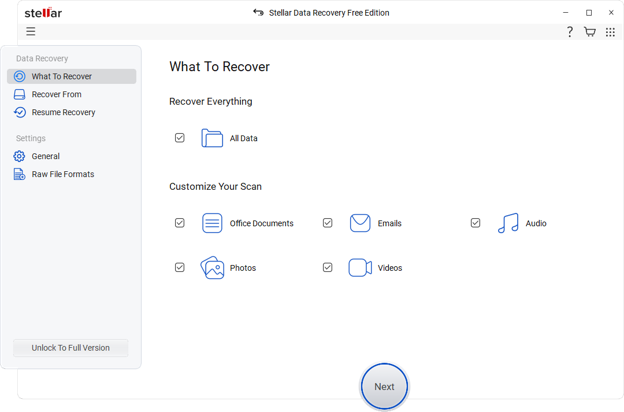
  1. Select what you lost. Choose the file type — documents, photos, videos, emails, or “everything” if you’re not sure.

Data Recovery Step 2

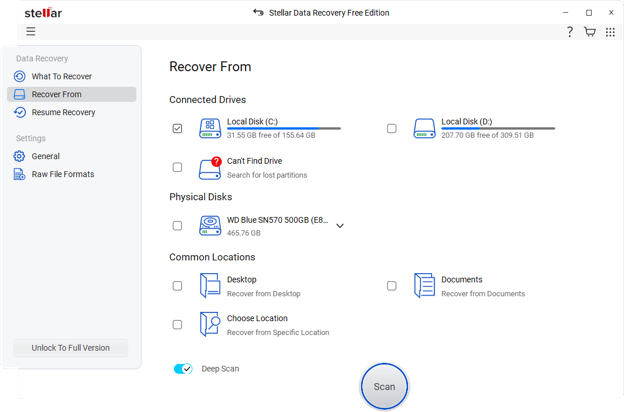
  1. Pick the location. Select the drive, folder, or USB device where the files used to be.

Data Recovery Step 3

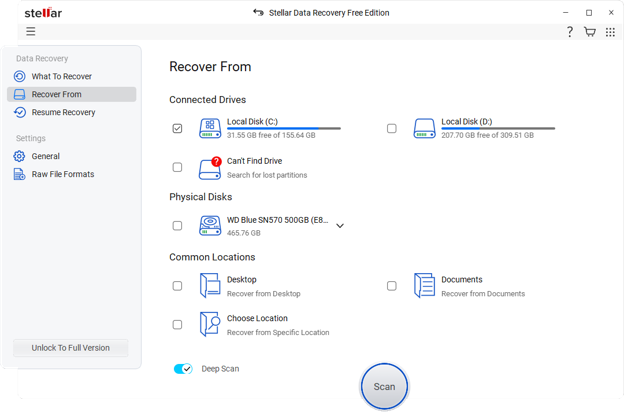
  1. Run a scan. The free version scans your selected location and shows you a preview of recoverable files before you commit to anything.
  2. Preview and recover. Check the files you need, and recover them to a different drive than the one you’re recovering from — never save recovered files back to the same location.

A few honest notes for students:

  • Size limits. The free version has a recovery size limit, so it works best for a handful of important files rather than an entire lost drive.
  • Act quickly. Recovery odds are highest when you act quickly and stop using the affected drive right away.
  • Physical damage. It won’t help with physically damaged drives (unusual noises, drive not detected) — those need professional data recovery services.

Building a Habit, Not Just a Fix

Recovery tools like Stellar Data Recovery Free are a great safety net, but they work best as backup, not as your main strategy. Students who lose the least work usually are not running the fanciest data recovery. They just back things up out of habit, without thinking about it.

A simple rule to carry through your student years: if losing it would upset you, keep it in at least two places. Get into that habit early, and a crashed laptop becomes a minor annoyance instead of a crisis.

Share This Article

How Cybercriminals Target macOS Users in 2026

A shadowy figure sits in front of a screen with white and colourful computer code over black.

For years, Mac users benefited from a reputation that made cyber threats seem like a problem for other platforms. While Windows users were routinely warned about malware, ransomware, and malicious downloads, Apple users often heard that macOS was inherently safer and less likely to be targeted.

Although Apple’s security architecture remains one of its strongest advantages, the belief that cybercriminals largely ignore Macs has become increasingly outdated.

The reality is that attackers follow opportunity, not operating systems. As Apple’s market share has grown, so has the value of the data stored on Mac devices. Today, MacBooks are widely used by business owners, developers, designers, executives, remote workers, and cryptocurrency investors. These users often manage sensitive information, financial accounts, client data, and digital assets, making them attractive targets for cybercriminals looking for profitable opportunities. As awareness of these risks grows, many users are turning to dedicated security solutions such as Moonlock for Mac to strengthen their defenses against evolving threats.

What makes modern attacks particularly concerning is that they rarely begin with sophisticated technical exploits. In many cases, attackers succeed by convincing users to lower their guard. Rather than attempting to break through Apple’s security protections directly, cybercriminals often rely on deception, trust, and human error to gain access to valuable information.

How Attackers Use Fake Software and Malware to Steal Data

One of the most common ways cybercriminals target macOS users is through fake software downloads. A user searching for a free PDF editor, video converter, or productivity tool may come across a website that appears completely legitimate. The application installs normally, functions as expected, and raises no immediate concerns.

Behind the scenes, however, the software may contain malware designed to collect browser passwords, authentication cookies, stored payment information, and cryptocurrency wallet data. By the time the victim notices unusual activity, the stolen information may already be circulating on underground marketplaces.

This trend has contributed to the rise of information-stealing malware specifically designed for macOS. Unlike traditional malware that disrupts systems or displays obvious warning signs, modern stealers are built to operate quietly. Their primary objective is to gather valuable data without attracting attention, allowing attackers to monetize stolen credentials and personal information for as long as possible.

Why Phishing Continues to Work Against Mac Users

Despite advances in cybersecurity technology, phishing remains one of the most effective attack methods targeting Mac users. Cybercriminals no longer need sophisticated exploits when a convincing email can achieve the same result.

Modern phishing campaigns are highly polished and often mimic trusted brands with remarkable accuracy. Attackers frequently impersonate Apple, banks, delivery services, streaming platforms, and workplace software providers. Their messages are designed to create urgency by claiming that an account has been locked, suspicious activity has been detected, or immediate action is required.

The goal is simple: persuade the recipient to click a link and enter sensitive information before taking the time to verify the request. Once credentials are submitted through a fake login page, attackers gain access to accounts that may contain personal data, financial information, or business communications.

Ironically, Apple’s built-in security features often function exactly as intended. The weak point is rarely the operating system itself. More often, it is the human decision-making process that attackers exploit through carefully crafted social engineering tactics.

The Growing Value of Credentials and Cryptocurrency Assets

Cybercriminals have become increasingly focused on stealing access rather than compromising devices outright. A decade ago, attackers primarily targeted banking credentials. Today, they are equally interested in browser sessions, cloud accounts, and cryptocurrency assets.

Cryptocurrency holders have become particularly attractive targets because digital assets can often be transferred quickly and are difficult to recover once stolen. As a result, malware developers have created Mac-specific threats designed to search for wallet extensions, seed phrases, exchange credentials, and other cryptocurrency-related information.

The financial incentive is obvious. While a stolen streaming account may have limited value, access to a cryptocurrency wallet or business email account can generate significantly larger returns for attackers. This shift has encouraged cybercriminals to invest more resources into developing threats tailored specifically for macOS users.

Security researchers have observed a growing number of campaigns focused on harvesting credentials and digital assets rather than causing visible disruption. These attacks are designed to maximize profit while minimizing the likelihood of detection.

Why Modern macOS Threats Often Go Unnoticed

Many people still associate malware with obvious warning signs such as constant pop-ups, system crashes, or dramatically reduced performance. Modern threats rarely behave that way.

A compromised Mac may continue functioning normally while malware quietly collects browser cookies, login credentials, sensitive documents, and other valuable information. Victims often remain unaware that anything is wrong until they notice unauthorized account activity, suspicious transactions, or alerts from online services.

By that point, the original source of the compromise may be difficult to identify. It could have been a browser extension installed months earlier, a software update downloaded from an untrusted source, or a phishing email opened during a busy workday.

This ability to remain hidden is one of the reasons modern cybercrime operations are so successful. Attackers benefit when victims do not realize they have been compromised.

Why Mac Users Need to Rethink Security Assumptions

The idea that “Macs don’t get viruses” may be one of the most dangerous misconceptions in cybersecurity today. While macOS includes strong built-in protections, no operating system is immune to evolving threats. Believing otherwise can encourage complacency and lead users to overlook basic security practices and routine Mac maintenance.

Cybercriminals are increasingly targeting macOS users because the data stored on their devices has significant value. Whether the goal is stealing credentials, accessing cloud accounts, harvesting cryptocurrency assets, or collecting sensitive business information, attackers continue to adapt their tactics to match changing opportunities.

This evolving threat landscape is one reason many users supplement Apple’s native protections with dedicated security solutions such as Moonlock for Mac. As attacks become more focused on phishing, credential theft, and social engineering, layered security approaches are becoming increasingly important.

The tools used by cybercriminals may change over time, but their motivation remains the same. Wherever valuable information exists, attackers will continue looking for ways to access it. And in 2026, Mac users possess more valuable digital assets than ever before.

Share This Article