Your Child Finished the Homework With AI. What Can They Explain Without It?

A young teen boy casually sits back while working on his laptop.

Imagine your child turning the laptop toward you with a finished math assignment. An AI assistant has helped explain the steps, and the answer looks right: if three notebooks cost $6, five cost $10. You ask how they found the price of one notebook.

There’s a pause.

You don’t have to decide what that pause means before asking your child to show you the part they understand and working from what they can explain. A small change to the problem can help you choose what to practice next, without turning the kitchen table into a cheating investigation.

A finished answer leaves a learning question

Recognizing an explanation and producing one independently are different tasks. A child might follow each line on a screen but still need help deciding where to begin when the explanation disappears.

Published on January 19, 2026, OECD’s review of AI and learning distinguishes better performance with generative AI from gains in learning. It also describes how AI used with a clear teaching purpose can support learning. The question is what the child has learned to do, not simply whether AI was involved.

That’s the practical concern behind cognitive offloading: handing thinking over to a tool can leave less of it for the learner to do. But a finished worksheet can’t tell you which parts your child understood. You need to hear or see some of the reasoning.

Call the follow-up an explain-and-change check. Ask about one step, then change the problem slightly. It’s a practice conversation, with no pass mark and no claim to detect AI use.

Agree on what you are checking

Choose something your child has already been taught. If the class is finding the price of one item, stay with that idea rather than introducing a harder method to find out whether they can cope.

You might say, “Let’s see which part makes sense and which part we should go over.” Keep the invitation small. One problem is enough to begin.

Put the generated solution out of sight for the first attempt, while leaving the original question available. This doesn’t mean removing accommodations or communication tools your child needs. They can draw their reasoning, write it down or explain it aloud; a polished spoken answer isn’t the goal.

Follow the teacher’s method and the assignment’s rules about AI. If you’re unsure what help was allowed, ask the teacher separately instead of trying to settle that question through this exercise. You can discuss understanding without making the child defend how the entire assignment was completed.

Give them time to think. Don’t turn the pause into a countdown.

Follow one problem beyond the answer

The Institute of Education Sciences recommends worked examples followed by independent practice, along with questions that ask learners to explain their thinking. Its guidance is about learning generally; the homework routine below is one way to apply those ideas, not a tested AI assessment.

Use the notebook problem to follow the reasoning, then try a nearby variation. Assume all the notebooks cost the same, with no tax added and no discounts.

Three notebooks cost $6. How much would five cost?

Ask your child why they’d divide $6 by 3. When they get $2, ask what that amount buys.

Let them show it.

They might draw three notebooks and share six dollars equally among them, then use the $2 price of each notebook to work out that five cost $10. The drawing counts as an explanation; there’s no need to insist on a particular sentence if the connection is clear.

Now change what the question asks. At that same price, how many notebooks could you buy with $8?

This time, the child has to use the $2 price to work out a quantity. Four notebooks fit the budget because four groups of $2 make $8. Allow them to draw the groups or use another method they’ve learned before you offer a hint.

These are possible responses, not a scoring guide:

Prompt Possible response A useful next move
Why do we divide $6 by 3? To find the price of one notebook. Ask how that helps price five notebooks.
How many can you buy with $8? Four, because each costs $2. Ask them to show that four notebooks at $2 each cost $8.
How did you choose that calculation? Because that’s what the answer says. Draw the three notebooks and revisit what the numbers mean.

Illustrative practice sequence. The calculations assume equal prices and no additional charges.

Use the response to choose the next step

A child who can explain the unit price and use it in the changed question has shown you enough to finish this check, without working through the whole assignment again. That doesn’t establish lasting mastery. They may still need practice recognizing the method in another setting.

If they can repeat “divide by three” but can’t connect the three to the notebooks, return to that connection. Draw three equal groups and label the total cost. Ask what amount belongs in each group before returning to the calculation.

Keep your own explanation focused. Then let your child take over. Give them a chance to use your explanation before you help with the next calculation.

If your child is tired or upset, leave it for later. You might also need to ask how the teacher introduced the method. Struggling with this one problem doesn’t tell you why they’re stuck or whether they used AI dishonestly.

If you contact the teacher, be specific about where the explanation stalled. For example, your child can divide six by three but can’t explain why the answer is the price of one notebook. That gives the conversation a specific starting point. You don’t need to attach a judgment about AI to it.

Try the same idea in a reading assignment

An explanation in reading needs support from the text. Keep the passage available, even when the AI-generated answer is put aside. You’re asking the child to reason with evidence, so there’s no reason to make them remember every sentence.

Consider this short fictional passage:

Maya packed her bag twice and checked the bus timetable again. At the stop, she asked whether this was the right bus.

Suppose an AI-assisted answer describes Maya as uncertain. Ask your child which detail supports that reading, and give them time to return to the passage before suggesting her repeated checking or her question at the bus stop.

Then offer another possibility: could she be careful about an unfamiliar journey? Ask how that interpretation fits the same details. You don’t have to announce a winning answer. Let your child explain what supports their reading and acknowledge what the passage doesn’t tell us.

If they repeat the AI’s wording, ask them to point to a sentence in the passage. They don’t need an elaborate answer. They just need to show you which words led them to that reading.

Keep help available while the child does the thinking

Once you’ve found the difficult step, use the lesson materials to work on it. A teacher-approved example gives you something to explain together before your child attempts another problem.

For parents still getting familiar with these tools, understanding what parents should know about AI provides wider context. During homework, keep the immediate task narrower: which explanation would help your child make the next attempt?

If the school permits AI assistance, you can ask for a hint about that step and compare it with the class materials before using it. A request for a hint doesn’t guarantee a correct or suitable response. Don’t require your child to create an account to carry out this routine; the question and a piece of paper are enough for the notebook example.

After giving help, return the problem to your child. Let them decide what to do with the explanation, and resist adding another prompt the moment they stop speaking.

Leave with one thing to practice

Finish when there’s a useful next step. Your child might be able to say, “I can find the price of one notebook. I still need help deciding when to divide.” You now have a specific question to return to with the teacher’s examples, instead of having to go through the entire assignment to find the difficult part.

You don’t need to repeat the check across every question on the worksheet. Leave the remaining difficulty specific enough to discuss, then revisit it with another familiar task when your child is ready.

The next time an AI answer appears, invite your child to identify one step they could explain without reading it back. They may still need help. Being able to say where that help is needed is a useful part of taking responsibility for their own learning.

About the Author:
Ryan Harris is a copywriter focused on eLearning and the digital transitions going on in the education realm. Before turning to writing full time, Ryan worked for five years as a teacher in Tulsa and then spent six years overseeing product development at many successful Edtech companies, including 2U, EPAM, and NovoEd.


Share This Article

What Does OCD Treatment Involve? Methods That Make a Difference

A teen girl smiled as she talks to her therapist in a counseling session.

Obsessive-compulsive disorder (OCD) involves unwanted thoughts, intense anxiety, and repeated behaviors or mental rituals. These symptoms can affect school, work, relationships, sleep, and daily routines. Effective care begins with an accurate assessment, then matches treatment methods to the person’s symptoms, age, health history, and goals.

Therapy often forms the foundation, while medication, family support, and practical coping skills can improve progress. Choosing the right treatment requires careful consideration.

Assessment and Diagnosis

Treatment begins with a detailed evaluation. A mental health professional asks about intrusive thoughts, repetitive behaviors, avoidance, distress, and the amount of time symptoms consume each day.

The assessment also examines how OCD affects home activities, education, employment, relationships, and physical health. Clinicians check for related concerns, including depression, anxiety disorders, tic disorders, or attention difficulties.

Some providers use neuropsychological testing when symptoms overlap with another condition. Testing can examine memory, attention, language, reasoning, and other cognitive functions. A clear diagnosis helps guide treatment decisions and prevents people from mistaking symptoms for ordinary habits or preferences.

Finding an experienced provider matters because OCD symptoms vary widely. People seeking OCD treatment in California can look for care that specifically addresses contamination fears, repeated checking, intrusive thoughts, symmetry concerns, reassurance-seeking, or hoarding-related behaviors. A suitable treatment plan should be tailored to the person’s actual symptoms, living situation, age, and treatment goals rather than relying on generic practices.

Cognitive Behavioral Therapy

Cognitive behavioral therapy, or CBT, is a leading therapy method for OCD. It teaches people to recognize obsessive thoughts without treating them as instructions or predictions.

The most established CBT method for OCD is Exposure and Response Prevention. ERP introduces feared thoughts, situations, objects, or sensations in a planned sequence. The person then practices resisting the usual compulsion, such as washing, checking, counting, or seeking reassurance.

Repeated practice changes the person’s response to anxiety. Over time, the brain learns that discomfort can decrease without performing a ritual. A qualified therapist adjusts exposure exercises gradually and monitors distress throughout treatment.

ERP does not involve forcing someone into an overwhelming situation. Sessions use preparation, consent, education, and structured practice. Progress also depends on completing the agreed exercises between appointments.

Medication Management

Medication can support therapy when OCD symptoms cause severe distress or interfere with daily functioning. Selective serotonin reuptake inhibitors, commonly called SSRIs, are frequently used for OCD.

A prescribing clinician reviews medical history, current medications, side effects, and treatment response. OCD medication often requires careful dose adjustments and regular follow-up. Patients should never start, stop, or change a prescription without medical guidance.

Medication works best when the care team tracks specific changes. Useful measures include time spent completing rituals, avoided activities, sleep quality, school or work attendance, and distress levels. These details provide a clear picture of medication effectiveness and whether adjustments are needed.

Family and Supportive Counseling

Family involvement can improve treatment consistency, especially for children and teenagers. Relatives sometimes provide reassurance, participate in rituals, change household routines, or avoid situations to reduce immediate distress.

A therapist helps family members respond without reinforcing compulsions. That response includes acknowledging distress, encouraging treatment skills, and setting consistent limits around rituals.

Supportive counseling addresses stress, shame, frustration, and relationship strain. It also teaches communication skills and practical ways to handle difficult moments between therapy sessions. For younger patients, caregivers often help organize exposure practice and track progress.

Daily Skills and Long-Term Progress

OCD treatment goes beyond appointments. Patients learn to identify triggers, tolerate uncertainty, delay compulsions, and return attention to ordinary activities.

A written plan can list warning signs, coping steps, therapist instructions, medication details, and emergency contacts. Sleep, regular meals, movement, and predictable routines support emotional regulation, though they do not replace OCD treatment.

Progress is measured by improved function, not the complete absence of intrusive thoughts. Many people continue to experience unwanted thoughts but respond to them with less fear and fewer rituals. Relapses can occur during stressful periods, so follow-up care helps protect progress and restore skills early.

Conclusion

OCD treatment involves more than trying to suppress unwanted thoughts. A complete plan combines accurate assessment with ERP-based therapy, medication management when appropriate, family education, and daily practice. The most useful next step is to record the symptoms, rituals, avoided situations, and time lost each day before scheduling an evaluation. That information gives a qualified clinician a practical starting point for selecting treatment methods and measuring meaningful improvement.

Share This Article

Beyond Filters: Teaching Kids (and Parents) to Use Online Tools Safely and Smartly

Illustration of a computer monitor surrounded by icons for time, video, writing, and ideas.

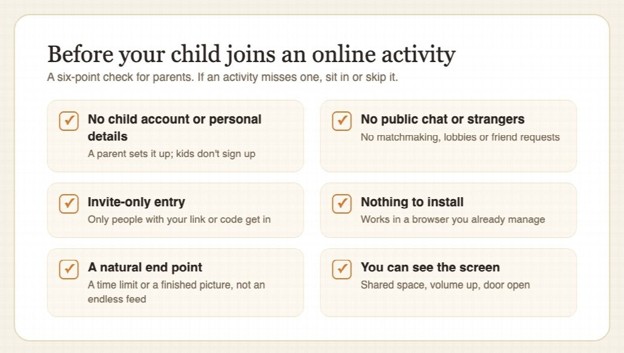
Every parent knows the feeling. You hand your child a tablet for a school research project, and twenty minutes later, you glance over their shoulder to find they’ve somehow wandered from a homework article about ancient Egypt to a strange corner of the internet you didn’t even know existed.

Your first instinct? Find a better filter. Install another app. Lock things down tighter.

Filters are a great starting point, and here at Safe Search Kids, we’re big believers in using them. But if filters are the seatbelt, digital literacy is knowing how to drive. Both matter, and one without the other leaves gaps that kids are remarkably talented at finding. Let’s talk about what it really takes to raise confident, capable, and safe digital citizens.

Why Filters Alone Aren’t Enough

Content filters and parental controls have come a long way. They block inappropriate websites, restrict search results, and can even monitor screen time. But they have some well-known limitations:

  • Filters can’t catch everything

New websites, apps, and platforms appear every day. No filter database updates fast enough to screen them all in real time.

  • Kids are resourceful

A quick search on a friend’s unfiltered phone, a creative misspelling, or a VPN tutorial on a classmate’s YouTube channel can bypass even robust protections.

  • Filters don’t teach judgment (!)

A child who has only ever been protected by filters doesn’t learn why certain content is harmful or how to react when they encounter something unexpected, and eventually, they will.

Think of it this way: you wouldn’t teach a child to cross the street by simply never letting them go outside. At some point, they need to understand traffic, look both ways, and make safe choices on their own. The internet works the same way.

Building a Foundation of Digital Literacy

Digital literacy encompasses a set of critical thinking skills that help younger generations navigate online spaces with awareness and intention. Here are the core areas every family should focus on:

1. Evaluating Sources and Information

Misinformation isn’t just a problem for adults scrolling through social media. Kids encounter misleading content in search results, on video platforms, and even in educational apps. Teach them to ask simple but powerful questions:

  • Who created this content, and why? Is it a news organization, a company trying to sell something, or an anonymous poster with no credentials?
  • Can I find this same information somewhere else? If only one website is making a claim, that’s a red flag.
  • Does this feel like it’s trying to make me angry or scared? Emotionally manipulative content is designed to be shared, not to be accurate.

These questions work for eight-year-olds researching dolphins and for teenagers reading about current events. Start early, and they become second nature.

2. Understanding Privacy and Personal Information

Kids often don’t grasp the permanence of what they share online. A fun quiz that asks for their birthday, school name, and pet’s name might seem harmless until you realize those are common security question answers. Help children understand:

  • Personal information is valuable. Explain in age-appropriate terms that data is a kind of currency online, and companies (and sometimes bad actors) want to collect it.
  • Think before you post. A good rule of thumb: “Would I be comfortable if my teacher, my grandparent, and a stranger all saw this?” If the answer to any of those is no, don’t share it.
  • Privacy settings exist for a reason. Walk through the settings on every app or platform they use. Make it a routine activity you do together, not a one-time lecture.

3. Recognizing Social Engineering and Manipulation

Phishing emails and online scams aren’t just targeting adults with bank accounts. Kids receive messages in games, on social platforms, and through chat features that try to trick them into clicking links, sharing information, or downloading malware. Teach them the basics:

  • If something sounds too good to be true, it probably is. Free in-game currency, surprise gift cards, and “you’ve been selected” messages are almost always scams.
  • Never click a link from someone you don’t know. And even if you do know them, verify first, because their account might be compromised.
  • It’s always okay to ask a parent before responding. Frame this not as a rule but as a safety habit, like checking the peephole before opening the front door.

The Parent’s Role: Guide, Not Just Gatekeeper

Here’s the part that’s sometimes harder to hear: parents need digital literacy, too. Technology evolves fast, and it’s okay to admit you don’t know how every app or platform works. In fact, learning alongside your child can be one of the most effective strategies.

Have regular, low-pressure conversations. Instead of waiting for something to go wrong, make internet safety a normal topic at dinner or during car rides. Ask what apps their friends are using. Ask what the funniest thing they saw online today was. These casual check-ins build trust and give you a window into their digital world.

Model the behavior you want to see. If you’re constantly on your phone, sharing personal details on social media, or clicking on sensational headlines without reading the article, your kids notice. Show them what thoughtful, intentional technology use looks like by practicing it yourself.

Create a family media agreement. Sit down together and set expectations. Not just rules handed down from above, but a collaborative agreement about screen time, acceptable apps, and what to do if something uncomfortable happens online. When kids have a voice in creating the guidelines, they’re far more likely to follow them.

When Things Go Wrong (And They Will)

No amount of preparation prevents every mistake. A child might stumble onto disturbing content, share something they shouldn’t have, or get involved in a hurtful online exchange. How you respond in these moments matters more than any filter setting.

  • Stay calm. If a child fears punishment, they’ll stop coming to you. Your first reaction sets the tone for every future conversation about online safety.
  • Listen first. Understand what happened before jumping to solutions. Often, kids already know something went wrong, but they need help processing it.
  • Solve it together. Whether it’s reporting a post, blocking a user, adjusting privacy settings, or simply talking through why something was upsetting, make it a team effort.

The Goal: Independence

Ultimately, the aim of teaching digital literacy is to work yourself out of a job. You want to raise a young person who can sit down at a computer, open a browser, and make thoughtful, safe decisions not because a filter forced them to, but because they know how.

Filters are the training wheels. Education is learning to balance. And open, ongoing family conversation is the road you ride together until they’re ready to go on their own.

Start those conversations today. You might be surprised how much your kids already know and how much they still want your guidance.

Share This Article

What Can an Online Student Information System Help Schools Manage?

A view from above of two women working in a school administration office.

There’s a folder somewhere in every school district with a kid’s entire academic life stuffed into it. Grades from three years back. Attendance records. Important notes and documents. Nobody wants to be the one who misplaces that folder.

Roughly 49.5 million students were enrolled in U.S. public schools as of fall 2023, according to NCES. That’s not a number worth dwelling on for long, but it puts the scale of the problem in perspective. Every one of those students has a file that grows every single year, and someone, somewhere, has to keep it straight.

The best way to handle this is to implement an online student information system. Wondering how it helps schools? Read on to get complete clarity.

Records Don’t Fall Apart When a Student Moves

Families relocate for many reasons. A kid transfers mid-October, and the new school needs access to their academic records and important documents quickly, not three weeks from now when the paperwork finally catches up.

An online student information system gives authorized staff centralized access to student records and related documents, making it easier to find the information needed when students change schools or their circumstances change. This can help staff avoid searching through separate paper files or spreadsheets when they need important student information quickly.

Reporting Doesn’t Eat Your Best People’s Time

Ask any school what drains their week, and state reporting comes up fast. Schools often need to prepare enrollment, attendance, and other information for required reporting. Rediker’s AdminPlus can generate state-specific reports, reducing the need for staff to compile the same information manually.

Preparing reports manually can take time and create additional administrative work. With state-specific reporting tools in place, staff can access and organize the information they need more efficiently.

Keeping Student Information Organized

Schools manage more than grades and attendance. Student information systems can bring academic records, attendance, behavior information, health details, contacts, and related documents into one centralized system. This gives authorized staff a clearer view of student information without having to search through separate files or spreadsheets.

For school administrators, having these records organized in one place can make routine information management easier and reduce the need to maintain the same information across multiple systems.

Having student information in one place can also make it easier to retrieve records when staff need them for everyday administrative work. Instead of relying on separate files for different types of information, schools can keep relevant records connected to the student’s profile. This gives authorized staff a more consistent source of information and can help reduce the duplication that comes with maintaining records across multiple systems. This can give school staff a more complete picture of each student’s information without switching between different systems.

Preventing Schedule-Related Stress

Creating a master schedule involves balancing course requests, teacher availability, rooms, time constraints, and section sizes. Rediker’s Master Schedule Builder helps schools manage these factors while identifying scheduling conflicts, giving administrators a more organized way to build and adjust schedules.

Tracking the Money Movements

Tuition, fees, balances, and payments can create another layer of administrative work for schools. Rediker’s AdminPlus includes student billing and payment tools that help schools manage financial information in one system. This can reduce the need to reconcile billing details across separate spreadsheets and records.

Keeping Staff Information Accessible

Student information systems aren’t only about student records. Rediker’s AdminPlus also includes staff information within its database, giving schools a central place to maintain important staff records alongside other administrative data.

Keeping staff information organized in one system can make it easier for administrators to access the details they need without maintaining separate records across multiple spreadsheets or files.

Conclusion

None of this is about chasing efficiency for its own sake. It’s about reducing the number of administrative tasks that can slow a school down. Student records stay organized, reporting takes less manual work, schedules are easier to manage, financial information is easier to track, and staff have access to the information they need. Taken together, these capabilities are less about technology for its own sake and more about giving school staff more time to focus on the work that requires their attention.

Share This Article