Parental Controls by Age and Temperament: Same Rule, Different Kid

If you have ever asked two nine-year-olds to put their tablets away, you know it can go two ways. One hands it over and goes off to play. The other bargains for ten minutes and ends up in tears. The rule was the same for both. What was different is temperament, and most advice on parental controls simply skips it.
Most guides to parental controls are organized by age, which makes sense. A seven-year-old needs a filter, and a sixteen-year-old needs room. But pediatricians have been saying for a while that age isn’t enough on its own.
The American Academy of Pediatrics now frames its screen advice around the 5 C’s of media use, and the first of the five is the child: what your child is like, and how screens affect them in particular. Child development researchers call the idea behind it “goodness of fit.” A rule that sits fine with one child can be too much for another, so how well it fits your child matters as much as the rule itself.
The first half of this article goes through parental controls age by age. The second is about adjusting those same screen time rules once you know how your child tends to react.

Parental Controls by Age: What to Set
When children are small, the settings do most of the work. As they get older, more of it shifts to what you’ve agreed with them, and the controls come down a little at a time.
Under 6: you choose what they see
At this age the worries are fairly simple: a video that wasn’t made for children, autoplay rolling from one clip to the next, and the odd accidental purchase. Stick to apps and sites you’ve approved, lock purchases, turn autoplay off, and keep sessions short with an obvious end. You don’t need activity reports yet, since you’re usually in the same room.
Ages 6 to 9: you set the limits
This is usually when kids start searching on their own, run into in-game purchases, and find out that video apps will happily keep playing all evening. A web filter set for their age, a daily time limit, your approval for new apps, and devices off at bedtime cover most of it. Location tracking and message monitoring can wait.
Ages 10 to 12: they start to manage their own time
For a lot of families this is the age of the first phone, and with it come group chats and online games played with people they don’t know. Move to a filter by category, keep app approval, and look at the week’s usage together. Many parents also switch from a daily limit to a weekly allowance with a daily cap, so the child gets some practice planning their own time. Private messages can stay private.
Ages 13 to 15: you agree the limits together
Social media, sleep and contact from strangers become the real concerns. A blanket daily limit tends to cause more trouble than it solves at this age, because it cuts off homework and friends along with everything else. A lighter filter, a phone that goes off at night, and limits on the two or three apps that actually cause problems usually work better.
Ages 16 to 17: they manage, you stay available
By now the aim is for them to manage without you. Keep the night lock if sleep is suffering, let them see their own usage figures, and agree on a date when the rest comes off.
The teenage years are the hardest stretch, partly because the job changes. You still want to protect them, but they also need room to practice running their own online life. The American Psychological Association’s health advisory on social media use in adolescence recommends adult monitoring of social media for most kids between about 10 and 14, and it spells out what it means by monitoring: ongoing review, discussion and coaching. Autonomy can then grow gradually as kids get older and more digitally savvy, and the advisory adds that monitoring should be balanced with a teen’s need for privacy.
Screen Time Rules for Kids: Adjust Them for Your Child
Temperament is the way a child tends to react, and you’ve probably known your child’s since they were a toddler, from how they left the park or took a “no” at bedtime. It shows up with screens too. A limit that one child shrugs off can start a fight with another.
Below are four common situations. Think back over the last few arguments about screens in your house and see which one sounds familiar. Plenty of children fit more than one, and none of this is a diagnosis.
When screen time ends in tears or shouting
If your child is fine for the whole hour and falls apart in the last thirty seconds, the limit itself probably isn’t the issue. The hard part for them is stopping.
A countdown seems like the obvious fix, but it may not help much. When University of Washington researchers followed families with children aged one to five, they found that a two-minute warning from a parent actually made the end of screen time harder. Transitions went more smoothly when they were part of a routine, when they came at a natural break like the end of an episode, or when the screen simply stopped on its own.
So try agreeing on the stopping point before the screen goes on: this episode, this level, or when dinner’s ready. Turn off autoplay, so the show ends without you having to end it. And when it’s still hard, which it sometimes will be, say so. “I know, it’s hard to stop” costs you nothing and lets them know you get it. If a screen has become the main way your child calms down, that’s worth working on first.
Best avoided: cutting the screen off in the middle of a game, or taking the device away as a punishment.
When every limit turns into a negotiation
Some children treat every limit as an opening offer. With them, the worst time to discuss the rule is while you’re enforcing it. Pick a calm moment instead, decide on the limit together, and explain how you got there. Then let the app hold the line, so there’s nothing left to argue about at eight o’clock. If they want more time, they can ask for it through the app and you say yes or no. A Dutch study of 10- to 14-year-olds found less family conflict over media when parents explained their rules and took the child’s view seriously, and more when the rules changed from one night to the next.
Best avoided: giving in out loud, one evening at a time. Every exception teaches them that arguing pays off. Be careful with screen time as a reward, too. In a University of Guelph study of young children, those whose parents used screen time as a reward or a punishment spent more time on screens overall.
When the worry is what they find online
Some kids click first and think afterwards. A time limit doesn’t really address that, because half an hour is plenty of time to stumble onto something they shouldn’t see. Set the filter stricter than their age would suggest, approve new apps yourself, lock purchases, and keep devices in the rooms you share. Once a week, go through the activity report together, the way you might ask about their day at school. No filter catches everything, so those talks end up doing a lot of the work.
Best avoided: relying on a time limit and nothing else.
When they follow every rule but tell you very little
A child who never argues can be harder to read than one who does. If something upsetting turns up in a message or a video, a child like this may keep quiet about it, worried that telling you will mean losing the device. Keep the settings light. A filter against accidental exposure and a night lock are usually enough. Show them exactly what you can and can’t see, then make them one promise and keep it: telling you about a problem will never cost them their tablet or phone.
Best avoided: close monitoring when they’ve given you no reason for it.
If none of this sounds like your home, and limits fall apart however you set them up, there may be more going on than temperament. Safe Search Kids looks at that in why parental controls don’t work for every child.
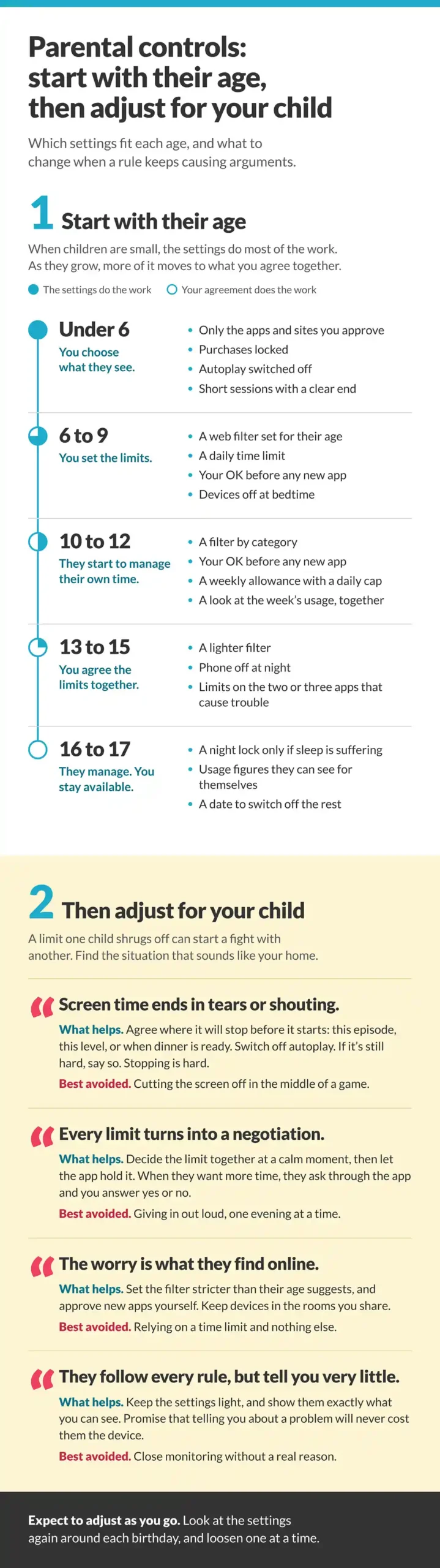
We’ve put the age settings and the four situations together in the infographic below, in case you want them on one page.
One Rule, Four Homes
To see how this plays out, take one ordinary rule: a nine-year-old gets an hour of screen time on school days. Here’s how four families might set up that same hour.
- If the ending is the battle, the hour finishes when dinner is ready. Autoplay is off, and they’ve agreed where they’ll stop before the tablet comes out.
- If everything gets negotiated, the hour was agreed on Sunday and lives in the app. More time is possible, but only as a request a parent answers from their phone.
- If content is the worry, the hour happens in the living room, on a profile that only opens approved apps.
- If the child quietly follows the rules, the hour is a countdown they can see, nothing locks except at bedtime, and they know that telling a parent about a problem will never cost them the tablet.
None of these families is stricter than the others. Each one has worked out what would make the rule fall apart in their house and set things up to avoid it.
Should You Monitor a 14-Year-Old’s Phone?
In most cases, yes, though what monitoring looks like should change. Fourteen still falls within the age range where psychologists recommend that adults stay actively involved in a teen’s social media use. Usage reports that show which apps they use, for how long and at what time of day, together with regular conversation, are in line with that advice, and they’re easier for a teen to see as fair.
Reading their private messages is another matter. It’s hard to justify unless you have a specific reason to worry about their safety. Research on parents and teenagers has found that much of what parents know comes from what teens choose to tell them, so anything that makes a teenager stop talking tends to cost more than it gains. Whatever you decide, tell them. Teens can usually live with monitoring they know about. Finding it on their own is a different story, and that kind of trust takes a long time to rebuild.
What to Look for in a Parental Control App
Every major platform now has free built-in parental controls, and for plenty of families those are enough. Dedicated software such as Salfeld Child Control gives you finer control. Whichever route you take, check that it can do the following:
- Warn the child before the lock kicks in, so they can save a game
- Let the child ask for more time, and let you answer from your own phone
- Filter websites by category and age, and set limits on individual apps
- Send you a daily or weekly summary you can go through together
- Apply one limit across all their devices, with daily and weekly limits
When to Turn Off Parental Controls
There’s no particular age for this. Controls come off one at a time, as your child shows they don’t need them anymore, and that depends on temperament as much as on age.
A fair sign they’re ready for the next step: most weeks, they stop on their own before the lock, they tell you when something online bothers them, and their sleep and schoolwork aren’t suffering.
When you loosen something, change one setting at a time, tell them beforehand, and give it a few weeks. Many families start with time limits, then app approval, then the filter, and keep the night lock until last. If things slide, go back a step for a set period and explain why. A calm, careful child might be ready at 13, while an impulsive one could still need a filter at 16, and neither is unusual.
What Makes Any of This Work
Settings work best when your child understands why they’re there. So don’t install anything in secret, explain each limit when you set it, and go over the whole setup again around each birthday. Expect to adjust as you go. You’ll learn more from how your child reacts to a change than from any age chart, including the one above.
About the Author
This article was contributed by the team at Salfeld, a family software company based in Reutlingen, Germany, that has developed parental control software since 1998.
Feature image by Drazen Zigic on Magnific.