Parental Controls for YouTube
We are happy to offer a video filtering tool at the top of our website, but what if your child or teen is searching YouTube from a regular browser or smart phone? Fortunately, free parental controls for YouTube are available using your Google account.
Even though YouTube has restrictions on what users can post, it still contains questionable material that is not appropriate for every age group. However, there are a number of ways to make it a little safer with parental controls. And when using YouTube Kids in a browser or via parental controls on the YouTube app, it’s much more safe.
Activating Parental Controls on YouTube
In the past, you could only turn on safe search for Google’s regular search results to ensure safe browsing. After many requests from parents and educators, YouTube now has parental controls so that you can implement YouTube filtering in your browser when searching from YouTube.com. Further action was taken to create an entirely safe YouTube for kids. We will explore all of these options. For instant automatic filtering of videos from a variety of screened websites, explore our safe video search.
In this article you will learn:
- How to turn on Restricted Mode and how to lock it. This does not mean it will provide 100% safety when searching videos on YouTube, but it will help parents ensure the worst content is blocked.
- How to set up stricter parental measures for younger kids on computers and laptops.
- How to protect children using a special app on mobile devices, such as tablets and phones.
To fully monitor or block how family members access the entire internet, explore parental control software and apps for all devices.
How to Set Up Restricted Mode for YouTube
To implement the YouTube Restricted Mode, go to YouTube.com and scroll down to the bottom of the page….
You will see a reference to Restricted Mode: Off...
Click the drop down arrow and details about ‘restricted mode’ will appear…
Clicking On followed by the Save button will activate ‘Restricted Mode’ but will not lock it.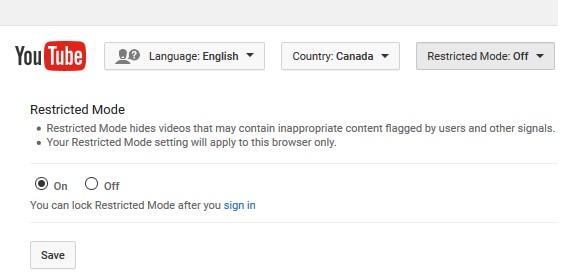
Locking YouTube Safe Search
As you will see, it’s very easy to turn safe search on and off. Therefore, you may want to lock it in order to ensure it is always activated for all family members.
To activate parental controls for YouTube, you will need a Google account. To open a free Google account, go to google.com and click “Sign In” in the top right hand corner of their main website. You will then see the option to create a new account.
Now return to YouTube (while signed into your account) and scroll down to the bottom of the page to the Restricted Mode link.
After selecting the “On” button, you will see an option to Save. Then log out of your account.
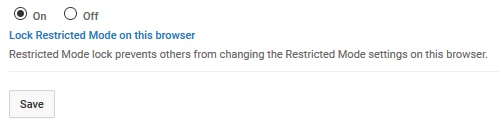
Restricted Mode is now activated you can now log out of your account. Unlocking restricted mode on YouTube will require you to log into your account. This guarantees that no one else can deactivate the safety setting.
Important: If you have more than one browser on your computer, you will need to follow these steps for each browser. Below is a video that walks you through the process of implementing YouTube Parental Controls that were just explained.
Even with parental controls for YouTube activated, many parents and educators find YouTube inappropriate for their kids. Utilizing an AI Content Checker can help assess the suitability of video content for children. For younger children especially, some parents skip the platform altogether and choose a dedicated app offering safe, ad-free videos for kids, where every clip is screened and there are no autoplay rabbit holes or open comment sections.
Along with these measures, exploring teenage counselling online could provide teens with extra support, helping them handle any emotional challenges that arise from exposure to online content. Our safe video tab on the top of our website offers strict filtering of videos from a variety of safe sources.
Parental Controls Using YouTube Kids
Alternatively, you can restrict your younger family members from using YouTube entirely. Go to YouTube Kids to set up a parent account. Follow the instructions and when complete, you can direct your kids to use the same website. Parents can choose the appropriate level of content for each child. Your selection impacts the types of videos available within YouTube Kids.
Content Experiences Include:
- Preschool (ages 4 and under)
- Younger (ages 5-8)
- Older (age
KidzTube Videos: Please note that the search feature tab for video at the top of our website delivers safe filtering videos from educational and filtering websites only. However, it does not restrict children from going to other browsers to search Google. We have an app for that as well. Continue reading…
Parental Controls on YouTube App
When kids are using YouTube on their mobile phones, the steps to protecting your kids is similar.
- Visit your devices app store and search for YouTube Kids
- Download the YouTube Kids App.
- Follow the instructions to set up your parental account with a pin number.
- If the regular YouTube app is already installed, delete it from your child’s phone.
- Show your child the new YouTube Kids apps on their phone and let them loose to explore safely.
To ensure safe searching for every age of kids in your family, you can also delete any installed browsers. Then, download our safe search app for safe searching of Google and other filtered resources. It called the KidzSearch app and provides the same filtering as seen on the top of this website.
Safe YouTube Summary
Parents put a lot of trust in safety tools and resources provided from various sources to protect their kids online. As children age, internet filtering and monitoring by parents can be eased, but will never be totally removed until they are fully grown and move out on their own to begin life as a adult. In the meantime, it’s also important to teach kids the value of responsible internet use. This includes searching YouTube for videos that can provide positive entertainment and educational benefits.
Watch this Video for Step By Step Instructions to Lock Safe Search with YouTube parental controls.
Learn more about online safety for kids, including privacy concerns and how to make YouTube Safe with parental controls.
Read this parents guide about understanding AI generated YouTube content.