

Top 5 Autism Friendly Dog Breeds
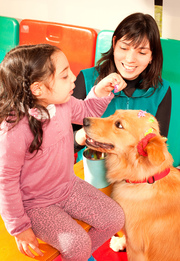
Adopting a pet or getting an assistance animal for an individual with autism can have several benefits, from giving them the comfort of having a loyal furry friend to a dog specifically trained to help them live independently. However, there are breeds better suited for individuals with autism than others.
Here’s a curated list of five autism-friendly dog breeds to assist you in determining which dog is best for the autistic individual in your family.
What Makes a Dog Autism-Friendly?
Dog breeds with a calm and affectionate temperament tend to match well with individuals with autism. These dogs are often patient, tolerant of unruly behavior, and keep cool in unexpected situations. Such qualities provide stability to the owner, helping them manage their daily challenges.
Best dog breeds for autistic individuals are also larger. Since large breeds are less likely to be intimidated by sudden hugs, owner’s approach, or other similar physical interactions, they are great for individuals with autism.
Dog breeds matching this profile can be trained to provide autism assistance. These assistance animals help their autistic handler, whether child or adult, live independently. Autism assistance dogs can greatly benefit the handler by providing deep pressure therapy, controlling crowds, blocking people from getting too close, and more.
Although autism assistance dogs aren’t accessible to everyone due to the extensive training needed, any dog can become an emotional support animal. Since autism is a neurological development disability, diagnosed individuals can get an ESA letter to get protection under federal law. However, only service animals, such as autism assistance dogs, are granted public access rights.
5 of the Most Autism-Friendly Dog Breeds
Here are the top 5 autism-friendly dog breeds.
Golden Retriever
Golden retrievers are well-known for being great companions for all kinds of individuals and families. Thanks to their affectionate and loving nature, golden retrievers are one of the best dogs for families with an autistic member. Since golden retrievers are just as smart dogs, they can also learn some of the tasks expected from autism assistance animals.
Bernese Mountain Dog
The size of the Bernese mountain dog may be intimidating at first but these dogs are the literal definition of a gentle giant. They are incredibly loving and good-natured dogs with a goofy side that make great companions, especially for autistic children.
Great Dane
The Great Dane is another fitting gentle giant for individuals with autism. These dogs have a much bigger stature that could dwarf other dogs, making them the perfect furry friend for full-body hugs. With proper training, Great Danes can become excellent autism assistance dogs for older children.
Standard Poodle
Poodles come in various sizes but the standard variety is more suited for autistic individuals. These curly dogs are not only very loving and affectionate but also compassionate dogs that want to please their owners. As with other dogs on our list, they can also become great autism assistance dogs for children and adults with training.
Bonus: Large Doodles
Goldendoodle, labradoodle, bernedoodle, boxerdoodle, and many others can be just as great dogs for individuals with autism. If you plan on adopting a hypoallergenic dog for someone with autism in your family apart from the poodle, you should also add some doodles to your list!
Finding the Best Autism Friendly Dog Breed
The dog breeds listed above make some of the best dogs for people with autism. However, just because a dog breed is autism friendly doesn’t mean all are good choices for you. At the end of the day, you’ll need to pick a breed that suits your life circumstances.
When choosing a dog breed for an autistic individual, consider everything that goes into having that dog as part of your family. Exercise and mental stimulation needs, training, coat care, and feeding should be at the top of your considerations.
Rather than specific traits that go well with autistic individuals, focus on breeds that match your family’s lifestyle. By doing so, you’ll not only have a fitting addition to your family but also find the most autism-friendly dog breed.






 Explore the Safe Search Engine -