Category: Safety | Internet Security

The Benefits of Proactive IT Support and Maintenance

The Benefits of Proactive IT Support and Maintenance

Running a business isn’t easy. If you are planning on starting your own or you’re already in charge of one, then you need to make sure that you take care of yourself online. Unfortunately, cybercrime has never been more common. Business owners who do not protect themselves leave themselves open to fraud.

If your business becomes the victim of fraud, then it could negatively impact your reputation and could get you in trouble with your industry regulator. Proactive IT support and maintenance is without a doubt the best way of keeping your business safe and secure online. This post will tell you about the benefits of it.

Complete and Total IT Support

Let’s be honest: the internet is a dangerous place. People are scammed and hacked on a daily basis. Taking a look at nTrust’s services make it clear that by hiring an IT support and maintenance company, you won’t ever have to worry about becoming a victim of cybercrime ever again. You are given complete and total protection, no questions asked. If you have any emergencies or concerns your support team will be there to help you at a moment’s notice.

A trained team of IT security experts will be able to identify, detect and deter all attempts at fraud. Their expertise is something you will not be able to gain yourself. Reliable IT security services ensure your business is protected from threats that could compromise your sensitive data and operations. By hiring a team of experts to protect you, you can focus on more important things like making sales and marketing.

Deterring Future Hacking Attempts

When you have an IT company protecting your business, you also benefit from the fact that criminals will be less inclined to try and hack and steal money from your business. Businesses that are unprotected are targeted by criminals because criminals share information about them and word spreads.

When you are looking for a security company to protect your business you need to make sure that you find one that is qualified and has enough experience to protect you completely. A good way of telling whether or not a company is worth working with is by reading his reviews.

Lots of companies do not have reviews nowadays and that is not necessarily a bad thing. Sometimes a company with no reviews simply is not annoying its customers. People only tend to leave reviews when they have had a negative experience. Positive reviews are good though.

Complete and Total IT Support

General IT Support

One of the very best things about hiring an IT support company to work with your business is that in addition to providing security services, they can also help you with other routine IT problems.

Obviously, if you do intend on hiring an IT security company to work with your business and you are going to want them to help you with other IT-related issues then you need to make sure that you tell them this from the very beginning. If you do not, then there is a chance they can refuse as additional work might not be included as part of their contract.

You will not have to pay much for extra coverage and services as long as you make your needs clear from the beginning.

You need to keep your business secure and safe from criminals. You can do that by following this post’s guidance and advice and implementing it into your company’s online security strategy.

Localized Support with a Strategic Advantage

For small and medium-sized enterprises, having IT support that understands the local business environment is a game changer. That’s where IT support for small businesses from GPK Group stands out. With a deep understanding of regional compliance, connectivity infrastructure, and business challenges, GPK Group delivers tailored support that aligns with your operations—not just generic solutions.

Whether you need helpdesk support, cloud solutions, cybersecurity, or network management, partnering with a local provider ensures faster response times and hands-on assistance when you need it most. Their proactive approach reduces downtime, boosts performance, and gives Perth-based businesses a competitive edge.

Share This Article

Protecting Your Family from Identity Theft While Traveling

Protecting Your Family from Identity Theft While Traveling

Traveling is a great way to explore new places, create memories, and bond with your family. However, while you’re enjoying your trip, you may also be exposed to the risk of identity theft. It is a serious crime with long-lasting and devastating consequences that can happen to anyone, anywhere, and at any time.

With a proactive approach, it is possible to minimize or even eliminate the possibility of identify theft. Read on and find out the best things to do.

How Identity Theft Can Happen When Traveling

When you’re traveling, you’re often in unfamiliar surroundings, which can make it easier for identity thieves to take advantage of you. Below are some ways by which you can be exposing yourself and your family to identity theft:

  • Unsecured Wi-Fi Networks: Public Wi-Fi networks are often unsecured, which means that anyone can access them. This makes it easy to intercept your personal information, such as your passwords, credit card numbers, and other sensitive data.
  • Lost or Stolen Documents: When you’re traveling, you may need to carry important documents with you, such as your passport, driver’s license, or credit card. If these documents are lost or stolen, they can be used to commit fraud.
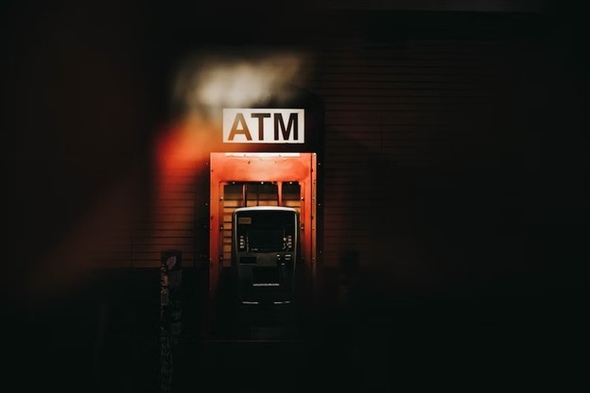
  • ATM skimming: Skimming is a technique to steal your credit or debit card information. They attach a device to the ATM that reads and copies information when you insert it.
  • Phishing Scams: Identity bandits may send you emails or texts that look like they’re from legitimate sources, such as your bank or credit card company. They’ll ask you to provide personal information or click on a link that will take you to a fake website where they can access sensitive data.
  • Shoulder surfing: This is when identity thieves look over your shoulder while you’re entering your PIN or other information into a computer or ATM.
  • Hotel Theft: Your hotel room may not be as secure as you think. Housekeeping staff, maintenance workers, and even other guests may be able to access your room and steal your personal information.
  • Rental Car Theft: Be careful about leaving personal information in the car you are renting. Such information can be used for fraudulent purposes.

Tips for Protecting Your Family’s Identity While Traveling

There are several steps you can take to protect your family’s identity while traveling. Here are some tips to keep in mind:

Secure Your Electronic Devices

Make sure your laptop, tablet, and smartphone have up-to-date security software installed. Use a strong password to lock your devices when you’re not using them. Monitor children when they are using electronic devices and educate them about the potential dangers of sharing information online.

Use Identity Theft Protection Software

These services use advanced algorithms and artificial intelligence to monitor your personal information, such as your social security number and credit card details, across the web. You’ll have plenty of options, but in many online comparisons, Aura won hands down. The company offers a range of identity theft protection services, such as credit monitoring, dark web monitoring, and identity restoration services.

Be Careful With Public Wi-Fi and Computers

Avoid using public Wi-Fi networks for anything sensitive, such as online banking or shopping. If you must use public internet connections, ensure the website is secure (look for the “https” in the URL). It can also be tempting to use public computers, such as those in hotels, but be careful. These computers may not be secure and could be infected with malware or keylogging software that can capture your personal information.

Don’t Carry Unnecessary Documents and IDs

Only carry the documents and IDs you need for your trip. Leave any unnecessary documents, such as your Social Security card, at home. Meanwhile, you should also avoid leaving them in unsafe places, such as a rental car.

Keep Your Wallet and Documents Close

When you’re out and about, keep your wallet and documents in a secure location, such as a zippered pocket or a cross-body bag.

Be Cautious When Using ATMs

How to Projects Against Identity Theft
Cover the keypad when entering your PIN. Check the machine for any signs of tampering, such as loose or unusual-looking card slots, and report anything suspicious to the bank.

Use an RFID-Blocking Wallet

RFID (radio-frequency identification) technology is used in some credit cards and passports to transmit information wirelessly. However, this can also make it easier for thieves to steal your information using a scanner. Consider using an RFID-blocking wallet or passport holder to help protect against this type of theft.

Be Aware of Your Surroundings

Pay attention to who is around you and be on the lookout for anyone who may be trying to steal your personal information.

Monitor Your Accounts Regularly

Keep an eye on your bank and credit card accounts to make sure there are no unauthorized charges. If you do see something suspicious, report it immediately. The earlier you report, the lesser the chance of compromising your family’s identity.

What To Do After a Case of Identity Theft

If you discover that your identity has been stolen while traveling, it’s crucial to take action immediately to minimize the damage. Here are some steps to take:

  1. Contact your bank and credit card companies: Report any suspicious activity or unauthorized charges on your accounts. They may be able to freeze your accounts and issue new cards to prevent further fraud.
  2. File a report with the local police: If your passport or other important documents were stolen, file a report with the local police department. This can help you get a replacement passport and may be required by your insurance company.
  3. Notify the credit bureaus: Contact the major credit bureaus (Equifax, Experian, and TransUnion) to place a fraud alert on your credit report. This will notify lenders that your identity may have been stolen and can help prevent further damage.

Conclusion

Identity theft is rampant, putting traveling families at risk. By taking the necessary precautions, monitoring your accounts, and educating your children about the risks of identity theft, you can help ensure that your family stays safe and secure while on the road. Remember to always be vigilant and report any suspicious activity immediately. Safe travels!

Share This Article

How to Protect Yourself from Man-in-the-Middle Attacks | Safer Communication

How to Protect Yourself from Man-in-the-Middle Attacks

Whether you’re sending sensitive work emails or having private conversations with friends and family, your data is vulnerable unless you take the necessary steps to protect yourself. In this article; we’ll show you how to reduce your risk of falling victim to a man-in-the-middle attack with some simple tips for safer communication.

We’ll also discuss what an MITM attack is; discuss cyber security basics; why it’s so dangerous and how you can detect if someone is trying to hack into your system.

So let’s get started.

What’s a Man-in-the-Middle Attack?

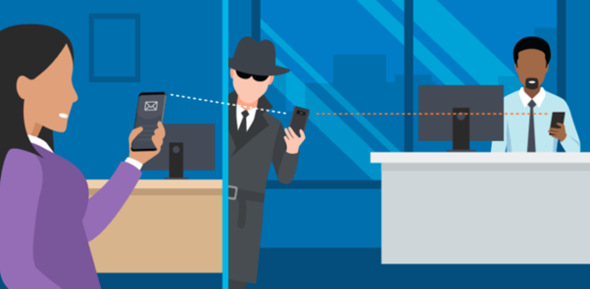
In a MitM attack, hackers obstruct communication between a user and the server. They attempt to eavesdrop or alter information without either knowing it has happened. This type of attack is possible because these online connections rely on trust, and attackers can almost seamlessly insert themselves in the connection.

It’s important for users to take essential steps to protect their data and communication from these attacks. There are easy ways for anyone to do this, which we will discuss later and stay secure.

How Does a Man-in-the-Middle Attack Work?

A MitM attack is a form of cyber attack that enables an attacker to obstruct communication between two parties and get access to confidential information. The attacker will act as an intermediary between two parties by secretly eavesdropping on the communication and altering it in order to get control.

The same concept applies when data is being transferred over the internet like an attacker can insert themselves in between two communication points, intercepting messages and manipulating them for their own interests. It’s important for web users to understand how these attacks work in order to take steps towards protecting their data from potential attackers.

What Are the Risks of a Man-in-the-Middle Attack?

When you fall victim to a man-in-the-middle attack, it’s not just your data that is potentially at risk. It’s also your online privacy. With the right amount of access, an attacker can hijack your accounts and view your messages or other sensitive information like banking details and passwords.

Data Breaches

If data is intercepted, a man-in-the-middle attack can lead to a data breach. This means the attacker can access personal information stored on the device.

Spoofing & Phishing

Man-in-the-middle attacks are also used for spoofing and phishing. Spoofing involves creating a bogus website with the same name as another one in order to trick users into entering their login details or other sensitive information. Phishing entail sending emails that seems to be from a legitimate company to trick users into giving away their personal details.

These attacks can have serious consequences if they are successful; victims suffer financial losses, and their identity can be stolen and used for malicious activities like credit card fraud, bank fraud or identity theft. That’s why protecting yourself and taking preventive measures against man-in-the-middle attacks is important.

How to Respond to a Man-in-the-Middle Attack?

When it comes to responding to a man-in-the-middle attack, you have several options. The key is to understand what’s happening so that you can take steps to protect yourself. Here are a few tips:

1.    Change Your Passwords

If you think your accounts may have been compromised, the first step is to change your passwords. Choose strong passwords comprising a combination of lowercase and uppercase letters, numbers and symbols. Try not to use the same password for multiple accounts or devices.

2.    Use Encrypted Communication Platforms

When sending messages or speaking on the phone, it’s best to do so through encrypted messaging platforms or services such as Skype for Business and Signal. These systems will encrypt your data and make it harder for hackers to monitor your communications.

3.    Install Security Software

It’s also important to install security software on your devices and make sure it stays up-to-date with the latest security updates. Security software will allow you to detect suspicious activity on your network and alert you if someone attempts a man-in-the-middle attack against you.

Tips for Protection From Man in the Middle (MitM) Attacks

It is possible to protect yourself from Man-in-the-Middle (MitM) attacks, and there are some useful tips for doing so.

1.    Securing Your Network Environment

The first step to protecting yourself from MitM attacks is to make sure your network environment is secure. This means using strong passwords and two-factor authentication, only connecting to trusted networks and keeping up with regular security updates on all devices. Be extra cautious while connecting to public Wi-Fi networks.

2.    Utilizing Encryption Protocols

Encryption protocols like HTTPS, SSL, and TLS ensure that all data being sent between you and a server is secure, making it hard for hackers to access this data. Be sure always to use a secure connection when sending data online.

3.    Monitoring Traffic Effectively

You can also monitor your traffic effectively by setting up an application firewall on your device or using a VPN service offering advanced traffic monitoring capabilities. This will help you keep tabs on any suspicious activity in the network and help identify potential attacks before they happen. Stay vigilant and use the safety tools available to make sure your data stays secure!
Common Signs of a Man in the Middle Attack

Common Signs of a Man in the Middle (MitM) Attack

Following are the most common signs of MitM attacks.

1.    Unexpected Messages or Requests

One of the first signs of a MitM attack is if you start seeing unexpected messages or requests that appear out of nowhere. Keep an eye out for strange notifications, pop-ups and warnings while surfing. Also, watch out for automated redirects and messages that can pop up during an online transaction.

2.    Unsecured Network Connections

Unsecured networks are especially vulnerable to MitM attacks, as people can easily get access to your data. When connected to public Wi-Fi, make sure you use secure VPN services and keep your software up-to-date so attackers won’t be able to exploit any bugs and get access to your paper trail.

3.    Advertisements for Suspicious Services

Advertisements for suspicious services can also be a sign of a MitM attack. These services might promise quick data transfer speeds but they might also offer malicious features like monitoring tools and keyloggers which can compromise your security and privacy. Always do your research before downloading third-party applications or connecting with unsecured networks and be sure you install the latest security updates right away!

What to Do if You Suspect You Are the Target of a MitM Attack?

If you believe your communication is being monitored, take these steps to protect yourself.

Use VPN

The first step is to check your connections and verify that they’re secure. If you’re using a public network, make sure that it is encrypted. You may also want to consider using a Virtual Private Network to establish a secure connection between your device on the internet and ensuring that data is confidential.

Install Antivirus Software

Another way to protect yourself is to install antivirus software on all of your devices. This will help detect malicious programs or activities that could be used for man-in-the-middle attacks, and alert you if any suspicious activities occur. It’s important to keep all of your software up-to-date as outdated versions are more vulnerable to attack.

Establish Secure Protocols

You should also consider implementing secure protocols or encryption standards in order to protect sensitive information from interception or compromise. These protocols can ensure that all communications between two parties remain confidential and authenticated, preventing man-in-the-middle attacks from successfully accessing data. You might want to consider using end-to-end encryption for confidential communications such as text messages and emails. This means that the message stays encrypted at both ends until it arrives at its destination securely.

Conclusion

In this digital age, we all need to take measures to protect ourselves from man-in-the-middle attacks. Doing so requires awareness of what is happening on the Internet and it also requires us to take proactive steps to better protect our information. By understanding these attacks and taking proper precautions, we can all make our communications safer and protect ourselves from potential malicious actors.


Share This Article

Things Parents Can Do to Make YouTube More Kid-Friendly 

How to Make YouTube More Kid-Friendly 

YouTube is one of the most popular online platforms, and it is used by people of all ages. While it can be an enjoyable experience for kids, there are also some risks involved with allowing young children to use this platform. That’s why it’s important for parents to take steps to make sure their children are having a safe and secure experience while using YouTube.

For those people who use Roku TV it is natural to want their children to watch YouTube Kids on Roku. Unfortunately, currently, Roku is not optimized to use the YouTube Kids app, but we have some tips for parents who want to make YouTube more kids-friendly.

Set Parental Control

With the Parental Controls, parents can now create various rules and adjust the settings in their child’s account, including which videos they can watch and which YouTube content should be blocked. Parental Control also allows parents to block certain channels and set time limits for watching YouTube videos.

Adjust Content Level

YouTube also allows you to adjust the content level for your child’s account. This setting allows you to choose between “General Audience” and “Younger Audience”, which will help filter out potentially mature or explicit content from appearing in their recommendations.

Monitor Their Activity

Parents should keep a close eye on what their children are viewing and interacting with, even when using YouTube Kids. This includes any comments they make, as well as the type of content they’re consuming. Parents should also consider setting up an account specifically for their child to monitor their activity.

Teach About Safety and Online Etiquette

The more knowledge a child has about how to behave on the Internet, the easier it is for parents to control him or her. Parents should talk to their children about how to stay safe online, how to behave in certain circumstances, and whom to report if any problems occur. They should also teach them about online etiquette, such as not leaving mean comments or participating in Cyberbullying.

Discuss Advertisements

Many videos on YouTube are accompanied by advertisements, which can sometimes be inappropriate for children. Parents should talk to their children about this and explain why certain commercials may not be suitable for them. Even if you have an ad blocker installed or purchased a Premium subscription, not all ads can be blocked on YouTube. Some YouTubers insert ads in the middle of videos, and they may be not suitable for a younger audience. So you need to warn children about the content they may come across.

Use YouTube’s Restricted Mode

YouTube’s Restricted Mode is an optional setting that parents can use to help filter out potentially mature or inappropriate content. To enable it for your child’s account, simply visit the “Restricted Mode” setting under your child’s account settings.

Use Content Filtering

Another way to help ensure your child’s safety on YouTube is to use a content filtering service. These services allow you to customize what types of videos and websites your child can access, which helps keep them from viewing potentially inappropriate or age-inappropriate content. Using such services allows one to up the security level and feel much less stressed.

Pause Watch History

You can also pause your child’s watch history. To do this, simply visit the “History & Privacy” setting under your child’s account settings and toggle the Pause Watch History option to “On”. This will prevent any videos they watch from being stored in their search history. By pausing their watch history, you ensure that any recommendations YouTube provides them are based solely on the type of content that is appropriate for their age.

Disable Search

One of the surefire ways to make YouTube more kid-friendly is to disable the search feature altogether. To do this, simply visit the “Search & Discovery” setting under your child’s account settings and toggle the Search option off. This will prevent them from seeing potentially mature or explicit content that may appear in search results.

Create Custom Playlists

Finally, you can also create custom playlists for your child to help keep their viewing experience kid-friendly. To do this, simply visit the “Playlist” setting under your child’s account settings and click “Create Playlist”. You can then add any videos that are appropriate for your child to watch.

These tips, combined with regular conversations with your child about YouTube safety, will help ensure that they have a safe and enjoyable experience using the platform. Remember, the most important thing is to empower them to make smart decisions while using YouTube.

Share This Article